

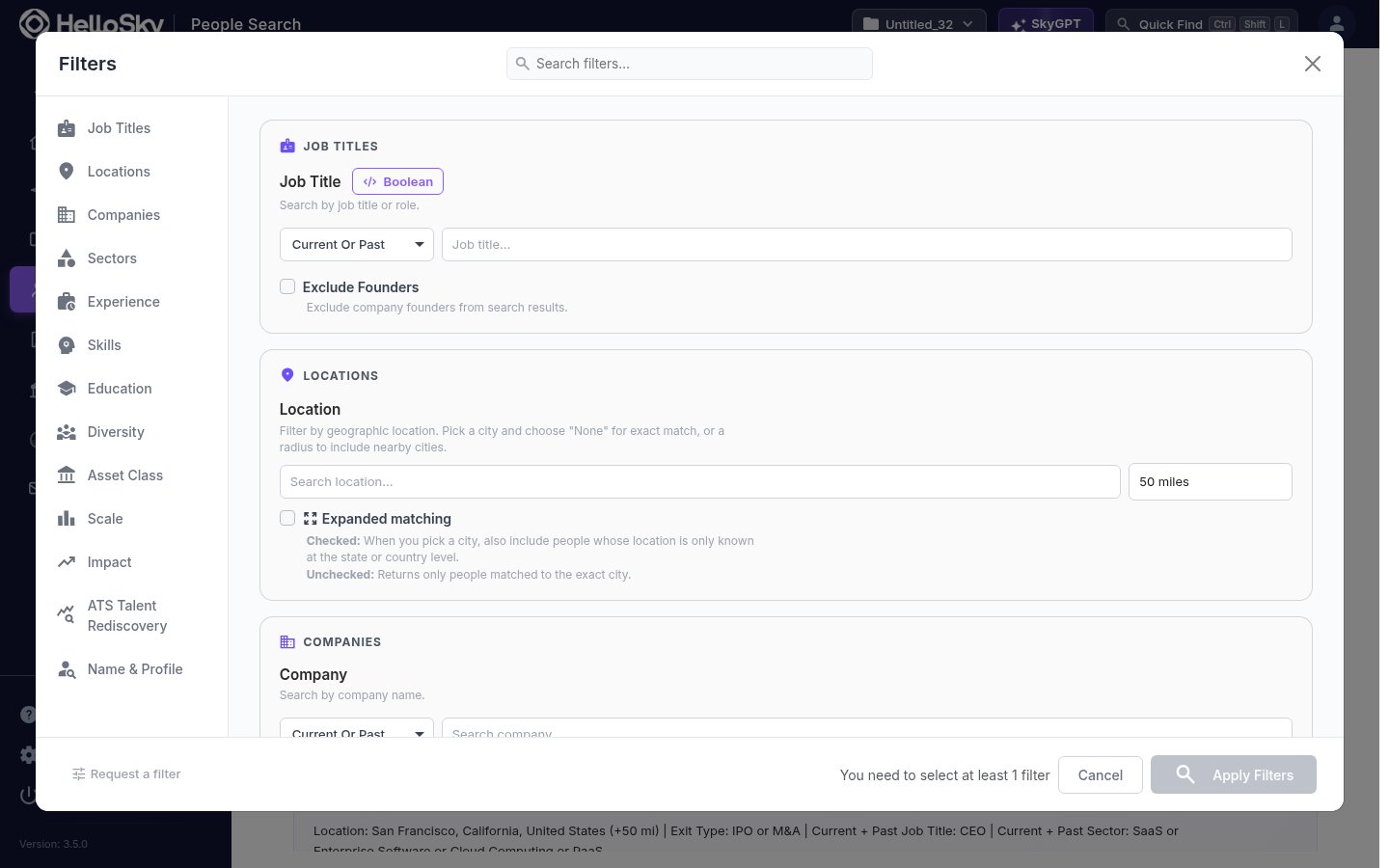
How filters work together
A few behaviors apply across the whole panel and explain most “why did I get these results?” questions:- Filters combine with AND. Each filter you add narrows the results. Within a single filter, multiple values usually broaden it (match any of them), unless you flip that filter’s AND/OR switch.
- Employment filters look for one matching role. When you combine several employment-related filters, HelloSky looks for a single job that satisfies them together. Job Title “CFO” plus Asset Class “Private - PE-Backed” finds people who were the CFO of a PE-backed company, not people who were a CFO somewhere and separately worked at a PE-backed company. This is almost always what you want, and it is why results feel precise.
- The live count is your feedback loop. The search button updates with the matching-people count as you edit. Add filters one at a time and you can see exactly which criterion narrows the pool.
- Filter hints. When a search comes back small (under 500 people), a sidebar shows how many people each active filter is excluding, so you can see which one to relax.
- Pinning. Every filter has a pin icon. Pinned filters appear in a “Pinned Filters” section at the top of the panel, and the arrangement is remembered for you.
- Finding a filter. The search box at the top of the panel filters the panel itself; type “tenure” to jump straight to Title Tenure.
- Missing something? The Request a filter link at the bottom of the panel goes straight to us.
Current, Past, or Current Or Past
Most employment filters have a scope dropdown with three options:
Use Past deliberately: searching past titles (“was a VP of Engineering”) finds people ready for a step up, while Current finds people already in the seat.
Semantic Expansion
Job Title, Company Text, Skills, and Profile Text each have a Semantic Expansion checkbox. Checked, your term is expanded to similar concepts using AI (“CRO” also finds “Chief Revenue Officer” and close variants); unchecked, only exact matches return. Expansion is per-term and shows you the expanded variants it added.Boolean expressions
Job Title and Sector support full Boolean expressions via their Boolean button:- Quote multi-word phrases:
"Chief Revenue Officer" - Group with parentheses:
("CRO" OR "Chief Revenue Officer") AND "SaaS" NOTbinds tightly:A OR B NOT Creads asA OR (B NOT C)- Wildcards:
*Energy*matches “Renewable Energy” - Operators are case-insensitive
When a term contains Boolean operators, Semantic Expansion is turned off for that term: you are asking for exact logic, and exact logic is what runs.
Job Titles
- Job Title: search by title or role, scoped Current/Past/Current Or Past, with Semantic Expansion and Boolean support. This is the workhorse filter; start here.
- Exclude Founders: removes people whose current role is founder. Useful when a title search like “CEO” keeps returning founders of two-person startups.
Locations
- Location: pick a city, state, or country. For cities, choose a radius: None for exact-city matches only, or 5 to 250 miles (default 50) to include nearby cities. View on Map previews your selection.
- Expanded matching: some profiles only carry a state- or country-level location. Checked, a city search also includes those people (a “San Francisco” search includes people only known to be “California”); unchecked, you get only people matched to the city itself. Off by default: turn it on when your pool feels thin, off when presence in the city matters.
- Nearby Locations: click Suggest Nearby for AI-suggested neighboring metros to add with one click.
Companies
- Company: people who work (or worked) at specific companies.
- Exclude Companies: removes anyone who has ever worked at these companies, current or past; the usual tool for off-limits lists.
- Company SmartTag: specialized industry tags such as disease areas, therapeutics, or technology domains, for targeting sharper than sector-level.
- Current Company Revenue ($M) and Current Company Headcount: filter by the company’s size today, regardless of when the person joined. Headcount uses standard bands (1-10 up to 10,000+).
- Funding Stage Experience: the person was working at the company during that funding round (Seed through Series H). “Series B” means they were there when the Series B happened, which is how you find operators with real early-stage scar tissue.
- Company Investors: filter by the investors backing the company, with an AND/OR toggle for requiring all versus any of them.
- Included / Excluded Company Lists: point the search at (or away from) your saved company lists, such as a Beacon market map or an off-limits list.
Sectors
- Sector: the company’s industry, with three refinements: the Primary sector only checkbox (checked: only companies whose main business is that sector; unchecked: primary or secondary), the AND/OR toggle, and full Boolean expressions.
- Related Sectors: click Suggest Related for adjacent sectors worth adding.
- Company Text: free-text search over company descriptions, products, and technologies, with Semantic Expansion. The tool for niches with no sector label yet.
- Customer Sector: the industries the company sells to, not the one it belongs to. A payments company selling to restaurants: Sector FinTech, Customer Sector Hospitality.
- Company Type: Product/Manufacturing versus Services businesses.
- Domains: B2B versus B2C.
Experience
- Career Years of Experience: total years of professional experience, min and max.
- Title Tenure (years): how long someone held a role, in decimal years (1.5 = 18 months). For current roles, measured from start date to today; for past roles, start to end. Great for filtering out job-hoppers or finding people due for a move.
- Department: functional area (Engineering, Finance, Sales, Marketing, Operations, Human Resources, Legal, Product & Design, and more).
- Seniority Level: from Board Member and C-Level (CXO) through SVP/EVP, Managing Director/Partner, VP, Senior Director, Director, Head of, GM, Manager, Advisor, and Individual Contributor. Combine with Department for “senior finance people” without guessing title strings.
Skills
- Skills: specific technical or professional skills (e.g., Java, Machine Learning), with an AND/OR toggle and Semantic Expansion.
- Smart Tag: curated skill and technology-domain tags, picked from a browser rather than free text.
- Languages: spoken languages, 100+ options, with AND/OR.
Education
- Degree: Bachelors, Masters, PhD, MD, MBA, JD.
- Major: field of study, free text.
- School: university or institution, with autocomplete; common aliases are matched (searching “Wharton” behaves the way you would hope).
Diversity
- Gender: Female, Male, or Other. “Other” includes people whose gender is not recorded.
Asset Class
Filter by the ownership of the company where the person works or worked, scoped Current/Past/Current Or Past:- Public: publicly traded.
- Private: any privately held company.
- Private - PE-Backed: has private equity investors.
- Private - PE-Primary: the primary owner is a private equity firm.
- Private - VC-Backed: has venture capital investors.
Scale
Scale answers “what size company have they actually operated at?” using the company’s size during the person’s employment, not its size today. Toggle between Revenue and Headcount mode:- Revenue When Employed ($M): the company’s revenue range while they were there (slider from $0 to $100B+).
- Grew Revenue From → To ($M): they joined when revenue was around the “from” value and grew it to around the “to” value. Example: $10M → $100M finds executives who took a company through that arc. Matching is deliberately approximate (roughly ±25% at each end), because real careers do not land on round numbers; this filter also focuses on Director-level and above.
- Headcount When Employed: same idea for team size, in standard bands.
- Scaled Team From → To: joined at ~50 employees, grew it to ~500. Same approximate matching.
Impact
- Exit Type: people who have been through at least one exit as an executive: IPO (took a company public), M&A (their company was acquired or merged), or Buy-Side M&A (executed acquisitions from the buy side).
- Total Post-Hire Funding (millions): the total funding the company raised after the person joined. A proxy for “investors kept backing the company on this person’s watch”.
ATS Talent Rediscovery
This group appears only when your organization has an ATS connected (Clockwork, Invenias, Gem, Ezekia, or Thrive; set up under Settings → Connection Paths).- In [your ATS]: three options: Both (default, no effect), Yes (only people already in your ATS: rediscover candidates you already know), No (only people not in your ATS: net-new names). Matching is scoped to your organization’s own synced records.
Name & Profile
- Name: find a specific person by full or partial name; small misspellings are tolerated.
- Profile Text: free-text search across the whole profile: bio, headline, skills, interests, certifications, patents, and publications, plus job titles, employer names, and locations. Supports AND/OR and Semantic Expansion, and
NOTterms exclude a person no matter where the term appears. This is the catch-all when no structured filter fits: “battery chemistry”, “FDA approval”, “grid-scale”.
Still unsure what a filter will do? Add it and watch the live count, check the filter-hint sidebar, or ask us. If the filter you need does not exist, use Request a filter at the bottom of the panel.