> ## Documentation Index
> Fetch the complete documentation index at: https://docs.hellosky.ai/llms.txt
> Use this file to discover all available pages before exploring further.
# Email sequences
> Automated, multi-step email outreach you can enroll people into.
A sequence is a series of emails sent automatically on a schedule: an opener, then one or more follow-ups spaced days apart. Enroll people once and HelloSky handles the sending, stops the moment someone replies, and shows you exactly where every person stands.
Sequences live on the **Outreach** page: the **Overview** tab has a Sequences panel listing every sequence in your organization with its owner, enrollment counts, and reply rate.
## Create a sequence
On **Outreach → Overview**, click **New sequence** and choose how to start:
* **Generate with AI**: describe the role (or paste a job description or posting URL), and get a complete, editable sequence.
* **Write it myself**: start from a blank editor.
Either way you land in the sequence editor:
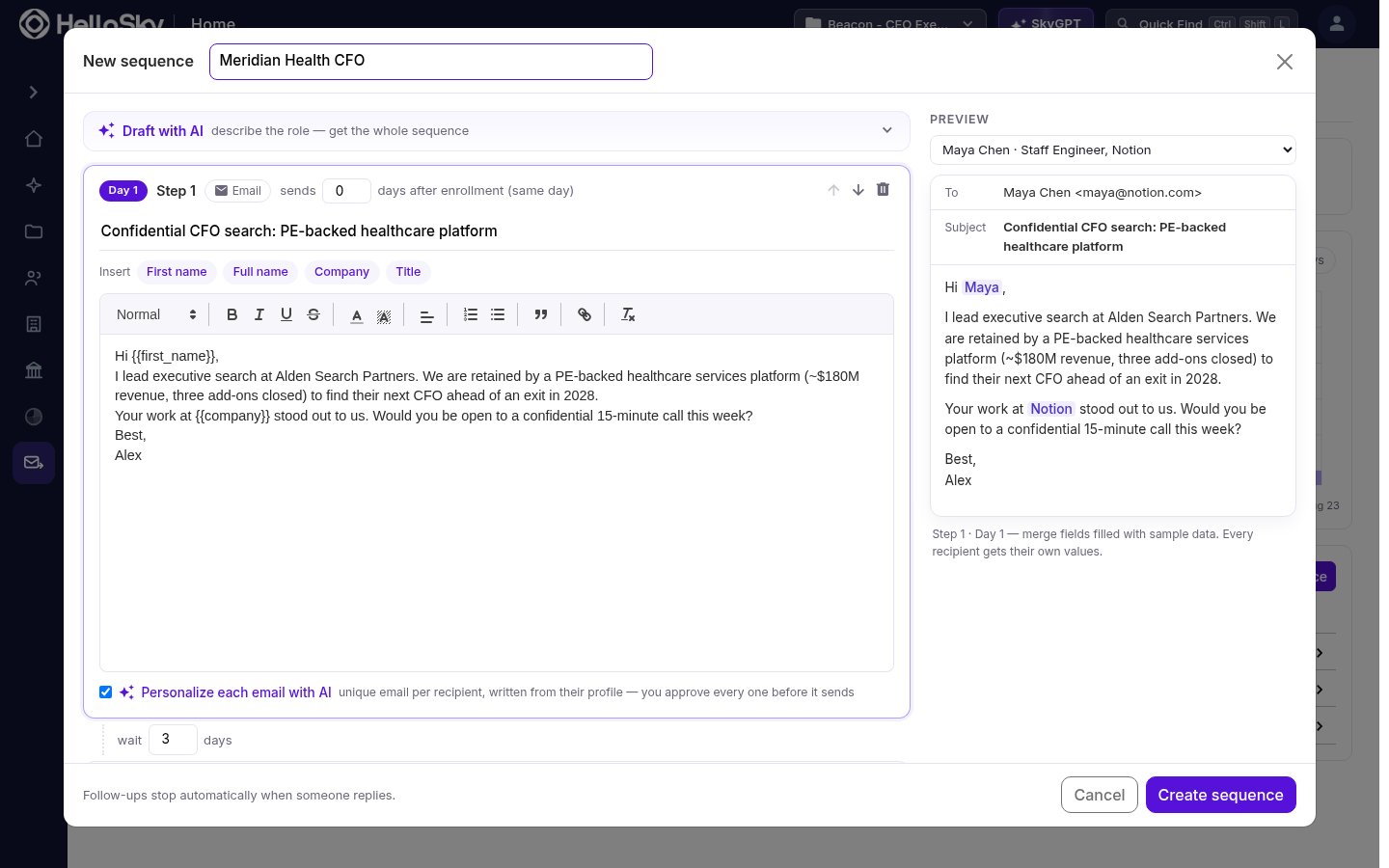 * Each step has a subject, a body, and a delay in days after the previous step. Follow-up steps are delivered as replies in the same thread as the opener.
* Use the **Insert** chips to drop in merge fields: `First name`, `Full name`, `Company`, and `Title` fill in per recipient at send time. The **Preview** panel shows the result with sample data.
* Check **Personalize each email with AI** on a step to have HelloSky write a unique email per recipient from their profile; you approve every one before it sends (see [Guardrails & approvals](/outreach/guardrails-and-approvals)).
Click **Create sequence** and it's ready to enroll people into.
## Enroll people
The fastest path is from a saved people list:
1. Open the list and select the people you want to contact.
2. In the bulk actions bar, click **Add to sequence** and pick the sequence.
You can also enroll a single person from the **Sequence** button on their profile. Enrollment is capped at 1,000 people per batch.
Before anything is enrolled, HelloSky shows you whether a teammate has already contacted or enrolled each person, so the same candidate doesn't hear from two people at your firm. The warning is informational; it never blocks you.
People we have no email address for can't be enrolled: they are skipped and reported back to you, along with anyone who was already in the sequence.
## Track and manage enrollments
Open a sequence to see its **Enrollments**: every person in it, which step they're on, their status, and when their next email goes out.
* Each step has a subject, a body, and a delay in days after the previous step. Follow-up steps are delivered as replies in the same thread as the opener.
* Use the **Insert** chips to drop in merge fields: `First name`, `Full name`, `Company`, and `Title` fill in per recipient at send time. The **Preview** panel shows the result with sample data.
* Check **Personalize each email with AI** on a step to have HelloSky write a unique email per recipient from their profile; you approve every one before it sends (see [Guardrails & approvals](/outreach/guardrails-and-approvals)).
Click **Create sequence** and it's ready to enroll people into.
## Enroll people
The fastest path is from a saved people list:
1. Open the list and select the people you want to contact.
2. In the bulk actions bar, click **Add to sequence** and pick the sequence.
You can also enroll a single person from the **Sequence** button on their profile. Enrollment is capped at 1,000 people per batch.
Before anything is enrolled, HelloSky shows you whether a teammate has already contacted or enrolled each person, so the same candidate doesn't hear from two people at your firm. The warning is informational; it never blocks you.
People we have no email address for can't be enrolled: they are skipped and reported back to you, along with anyone who was already in the sequence.
## Track and manage enrollments
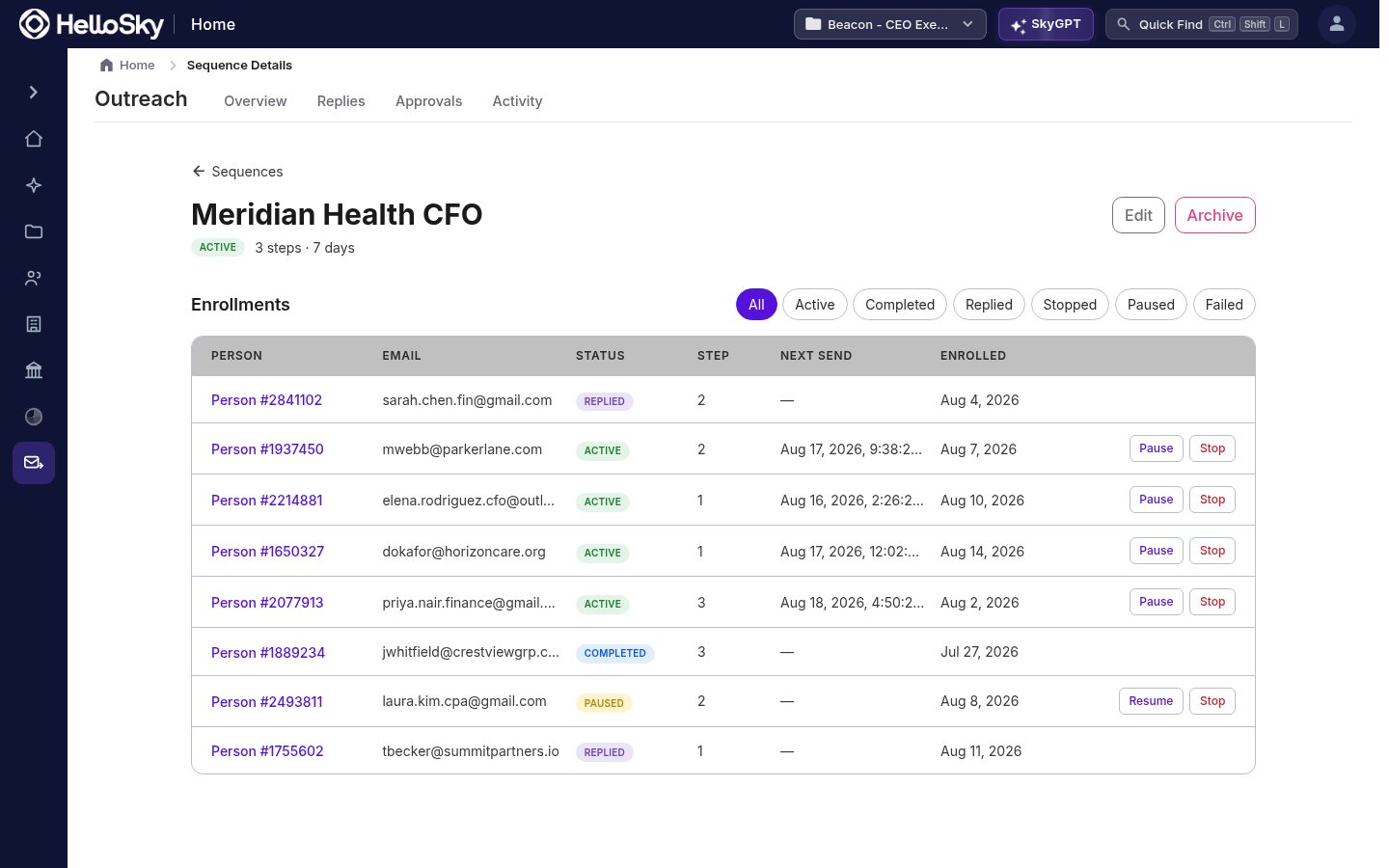
Open a sequence to see its **Enrollments**: every person in it, which step they're on, their status, and when their next email goes out.
 | Status | Meaning |
| --------- | -------------------------------------------------------------------- |
| Active | Follow-ups are still scheduled |
| Replied | The person answered; all remaining steps are cancelled automatically |
| Paused | Follow-ups are suspended; resume any time |
| Stopped | The enrollment was ended permanently |
| Completed | All steps sent with no reply |
| Failed | A send failed for this person |
You can pause, resume, or stop individual people without touching the rest of the sequence, and filter by status to focus on what needs attention.
Reply detection is automatic. The moment someone writes back, their remaining follow-ups are cancelled, so there's no risk of an automated "just bumping this" landing after a real conversation has started.
## Archive a sequence
Archiving a sequence from its detail page stops its scheduled sends and prevents new enrollments. Past sends and threads remain visible.
| Status | Meaning |
| --------- | -------------------------------------------------------------------- |
| Active | Follow-ups are still scheduled |
| Replied | The person answered; all remaining steps are cancelled automatically |
| Paused | Follow-ups are suspended; resume any time |
| Stopped | The enrollment was ended permanently |
| Completed | All steps sent with no reply |
| Failed | A send failed for this person |
You can pause, resume, or stop individual people without touching the rest of the sequence, and filter by status to focus on what needs attention.
Reply detection is automatic. The moment someone writes back, their remaining follow-ups are cancelled, so there's no risk of an automated "just bumping this" landing after a real conversation has started.
## Archive a sequence
Archiving a sequence from its detail page stops its scheduled sends and prevents new enrollments. Past sends and threads remain visible.