> ## Documentation Index
> Fetch the complete documentation index at: https://docs.hellosky.ai/llms.txt
> Use this file to discover all available pages before exploring further.
# Creating lists
> Save people, companies, and investors into organized lists.
Lists are where search results become work product. HelloSky supports **People Lists**, **Company Lists**, and **Investor Lists**, all found under **Saved** in the left navigation.
## Save from search results
1. Run any search.
2. In the **Save** column, click the save button on a row. A panel opens showing your existing lists.
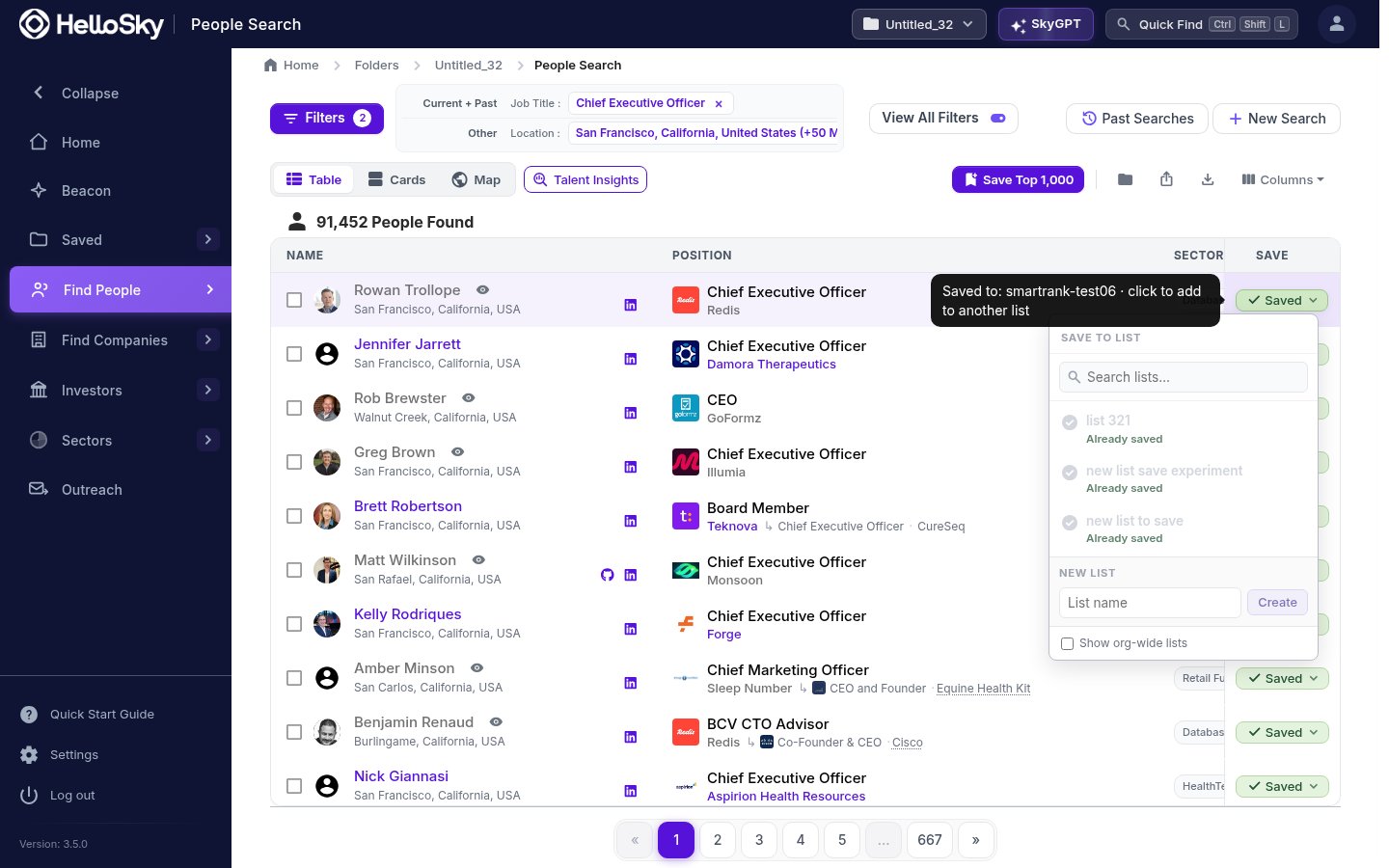 3. Pick an existing list, or type a name under **New list** and click **Create** to make one on the spot. The person is added immediately.
You can also select multiple rows and save them together, or use **Save Top 1,000** to capture the best matches from the whole result set.
## Save from a profile
Every person and company profile has a **Save** button in its header and next to the photo. It opens the same list picker.
## Add people directly to a list
From a list page, click **Add People** to search by name, or use **Actions, then Add People from CSV** to import an existing spreadsheet of names.
Check **Show org-wide lists** in the save panel to save into lists your teammates have shared with the organization, so the whole team builds one pipeline instead of five parallel ones.
Searches and saves happen inside your **active folder**, shown in the top bar. Keep one folder per project or engagement, and everything you save stays organized by client.
3. Pick an existing list, or type a name under **New list** and click **Create** to make one on the spot. The person is added immediately.
You can also select multiple rows and save them together, or use **Save Top 1,000** to capture the best matches from the whole result set.
## Save from a profile
Every person and company profile has a **Save** button in its header and next to the photo. It opens the same list picker.
## Add people directly to a list
From a list page, click **Add People** to search by name, or use **Actions, then Add People from CSV** to import an existing spreadsheet of names.
Check **Show org-wide lists** in the save panel to save into lists your teammates have shared with the organization, so the whole team builds one pipeline instead of five parallel ones.
Searches and saves happen inside your **active folder**, shown in the top bar. Keep one folder per project or engagement, and everything you save stays organized by client.