> ## Documentation Index
> Fetch the complete documentation index at: https://docs.hellosky.ai/llms.txt
> Use this file to discover all available pages before exploring further.
# Navigating the platform
> A tour of the navigation, folders, and the Home page.
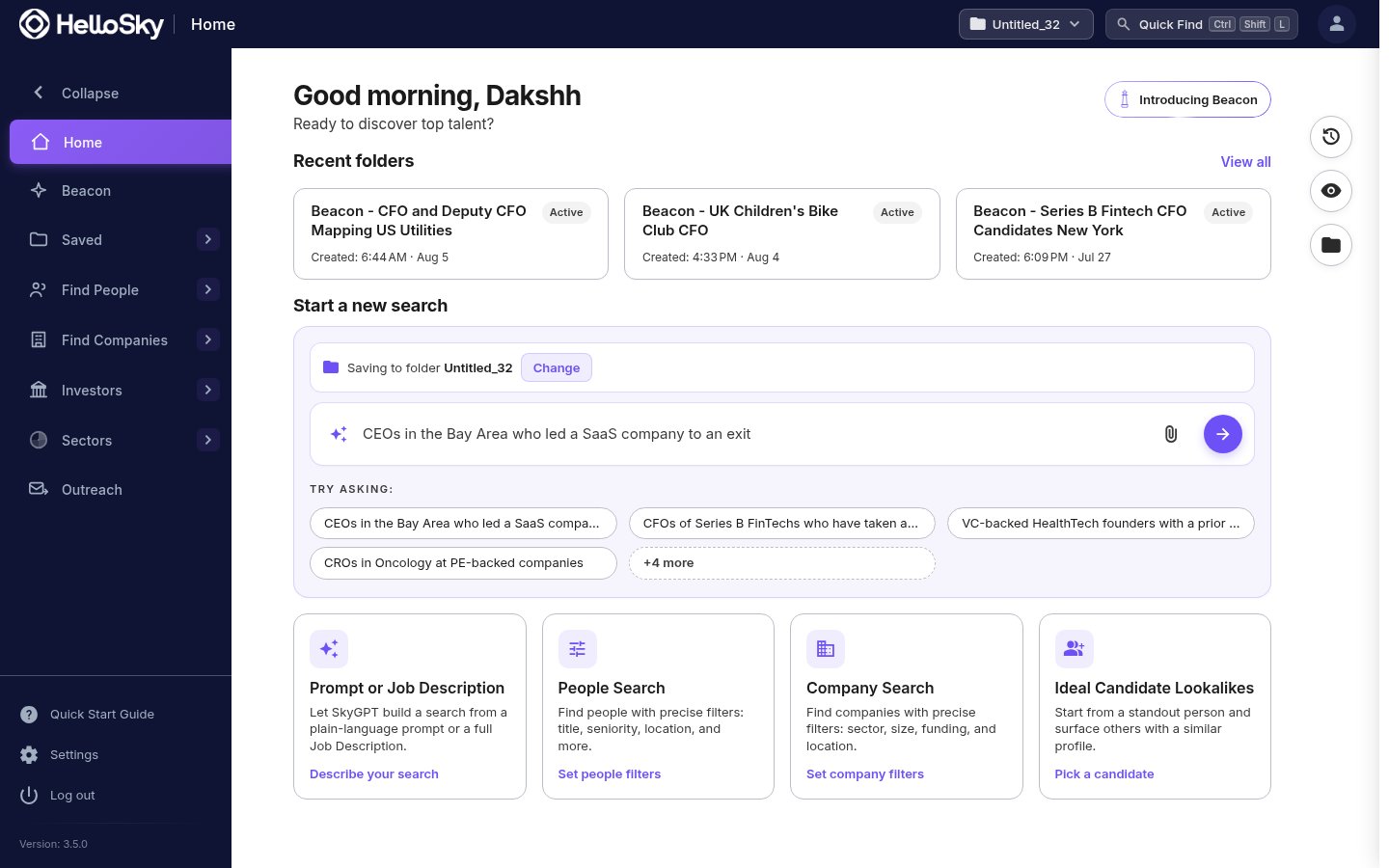 ## The left navigation
* **Home**: your dashboard: recent folders, search entry points, recent searches, and recently viewed people, companies, and investors.
* **Beacon**: the AI research agent. Brief it on a role and it delivers a ranked shortlist and market map.
* **Saved**: everything you have kept, organized as **Folders**, **People Lists**, **Company Lists**, and **Investor Lists**.
* **Find People**: **People Search** (filter-based) and **Similar People** (start from a reference person).
* **Find Companies**: **Company Search** and **Similar Companies**.
* **Investors**: **Investor Search** for PE and VC firms.
* **Sectors**: **Sector Intelligence**, an overview of HelloSky's sector taxonomy.
* At the bottom: **Quick Start Guide** (replay the tour), **Settings**, and **Log out**.
## The top bar
* **Active Folder**: the folder your searches, saves, and Beacon runs are currently filed into. Click it to switch or create folders; keep one per project or engagement.
* **SkyGPT**: describe who you need in plain language and get a built search. Available from every page.
* **Quick Find** (Ctrl+Shift+L): jump straight to any person or company by name.
* **User menu**: account shortcuts.
## Folders: the organizing idea
Almost everything you do in HelloSky happens inside a folder. A search you run, a list you save, and a Beacon run all land in the active folder shown in the top bar. When you switch engagements, switch folders, and each client's world stays intact: its searches, lists, shortlists, and market maps together.
## The Home page
* **Recent folders**: jump back into active engagements; Beacon runs appear here with an Active badge.
* **Start a new search**: four entry points: Prompt or Job Description (SkyGPT), People Search, Company Search, and Ideal Candidate Lookalikes.
* **Recent Searches and Recently Viewed**: pick up where you left off.
* **My Folders**: browse everything by folder, or create a new one.
Learn the two keyboard shortcuts early: **Ctrl+Shift+L** to find anyone by name, **Ctrl+Shift+S** to run the current search.
## The left navigation
* **Home**: your dashboard: recent folders, search entry points, recent searches, and recently viewed people, companies, and investors.
* **Beacon**: the AI research agent. Brief it on a role and it delivers a ranked shortlist and market map.
* **Saved**: everything you have kept, organized as **Folders**, **People Lists**, **Company Lists**, and **Investor Lists**.
* **Find People**: **People Search** (filter-based) and **Similar People** (start from a reference person).
* **Find Companies**: **Company Search** and **Similar Companies**.
* **Investors**: **Investor Search** for PE and VC firms.
* **Sectors**: **Sector Intelligence**, an overview of HelloSky's sector taxonomy.
* At the bottom: **Quick Start Guide** (replay the tour), **Settings**, and **Log out**.
## The top bar
* **Active Folder**: the folder your searches, saves, and Beacon runs are currently filed into. Click it to switch or create folders; keep one per project or engagement.
* **SkyGPT**: describe who you need in plain language and get a built search. Available from every page.
* **Quick Find** (Ctrl+Shift+L): jump straight to any person or company by name.
* **User menu**: account shortcuts.
## Folders: the organizing idea
Almost everything you do in HelloSky happens inside a folder. A search you run, a list you save, and a Beacon run all land in the active folder shown in the top bar. When you switch engagements, switch folders, and each client's world stays intact: its searches, lists, shortlists, and market maps together.
## The Home page
* **Recent folders**: jump back into active engagements; Beacon runs appear here with an Active badge.
* **Start a new search**: four entry points: Prompt or Job Description (SkyGPT), People Search, Company Search, and Ideal Candidate Lookalikes.
* **Recent Searches and Recently Viewed**: pick up where you left off.
* **My Folders**: browse everything by folder, or create a new one.
Learn the two keyboard shortcuts early: **Ctrl+Shift+L** to find anyone by name, **Ctrl+Shift+S** to run the current search.